
Go Back
Industry News and Updates

Sales Reporting in the GRS Portal: A Step-By-Step Plan & The Button Many People Miss
If you’ve ever opened a “sales info required” notice in the GRS portal and thought, “Okay… but what are you actually asking me for?” … well, you wouldn’t be the first!
Sales reporting is one of those compliance tasks that sounds straightforward (“just give us the numbers”), but can get overwhelming if your team doesn’t track sales by state or your reporting periods don’t match a calendar year.
We’re going to break down:
- what annual sales reporting is (and who’s responsible)
- which states require it (Detroit, NC, OH, OK, PA)
- how to complete sales reporting inside the GRS portal (step-by-step)
- how to handle the “we don’t track it that way” problem without spiraling
Annual Sales Reporting: What It Is, Why It Matters, And Why You Can’t Ignore The Email
Annual sales reporting is exactly what it sounds like: certain state/city agencies require license holders to report the number of units sold (not revenue) for stuffed articles and related products.
And here’s the part that matters for your day-to-day:
GRS requests sales information when it’s needed for renewal processing; it’s not a “nice-to-have” admin task. If we’re waiting on your sales report, we may not be able to invoice, submit paperwork, or complete a renewal on time (depending on your service level and the state).
That’s why we tell customers: please don’t wait to submit until your license has expired or the reporting period has been reached. Your role in ongoing compliance is to respond when the request shows up, so our team has time to process, communicate with agencies, and keep you out of late fees or off-sales situations.
Bottom line: sales reporting is one of the “small actions” that has an outsized impact on staying compliant.
Who Reports Sales: Manufacturer vs. Importer/Distributor And Why It Depends On The State
One of the biggest conceptual snags is simply knowing who is responsible.
- Detroit, Ohio, Oklahoma: the manufacturer is responsible unless an importer/distributor reports sales under their importer license (if they have one).
- Pennsylvania and North Carolina: these states do not offer importer licensing, so sales reporting is always the manufacturer’s responsibility.
If you’ve got multiple entities involved (manufacturer + importer + distributor), that’s where confusion creeps in. The simplest internal question to ask is: “Which entity holds the license that’s being renewed right now?”
That’s the entity that needs to provide the sales reporting info for that renewal.
And yes, if your team doesn’t track sales cleanly by state, you’re still expected to report. Some agencies explicitly allow estimates when exact records aren’t available.
The “We Don’t Track Sales By State” Problem: How To Estimate Without Overthinking It
Here’s something we see all the time: Customers don’t always have a system for tracking state-level units, and then they get stuck trying to figure out where the numbers are supposed to come from.
You’re not failing at compliance because your ecomm platform doesn’t spit out a perfect “units sold into Oklahoma” report. This is common, especially if you sell through multiple channels (DTC, Amazon, wholesale, retailers, distributors).
Here’s the good news: at least some agencies recognize that “exact” isn’t always possible.
For example:
- North Carolina guidance notes that if you don’t have an exact figure for internet sales, just estimate as closely as you can. They also prefer regional estimates rather than dividing by all 50 states.
- Pennsylvania explicitly says if you’re unsure of exact numbers shipped into PA, you should estimate or ask customers how many articles reached PA.
Ways to estimate units sold by state:
- Pull shipping data from your fulfillment provider (even if it’s imperfect)
- Use retailer/distributor shipment summaries
- Allocate by region rather than evenly across all 50 states
- If visibility is limited, make your best defensible estimate and document your logic internally
And a quick reassurance: sales reporting is about meeting the reporting requirement so your license renewal can proceed. The goal is timely, reasonable reporting, not perfection.
How To Submit Sales Reporting In The GRS Portal
This is the part your team will want to bookmark.
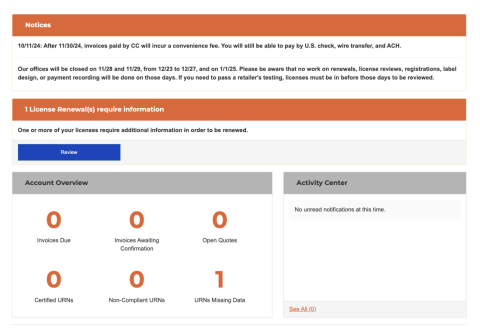
When licenses are ready to be invoiced for renewal, you may receive a Sales Information Request from the GRS Monitored Services team. You’ll see a notification when you log in and click Review to open the request list.
Step 1: Open The Request You Need To Complete
On the Renewal Info Requests page, look for Active Renewal Info Requests and click View. Any request in this section is waiting on you — and renewal work can’t proceed until it’s completed.
Step 2: Click Into Each State With A Red X
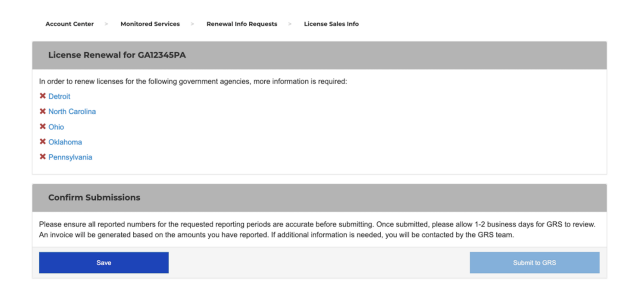
Inside the request, you’ll see the states that need information. Click the state link with a red X, enter the required info, and click Submit for that state.
Step 3: Handle State-Specific Requirements
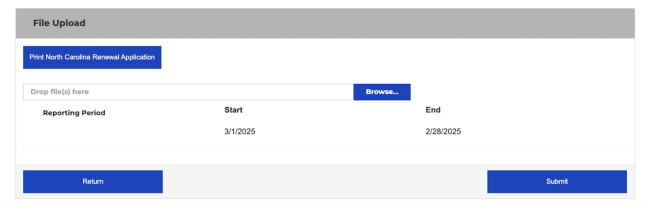
Some states require more than a number field. North Carolina, for example, requires you to print a renewal application, complete it, and upload it back into the portal. NC also requires a financial staff member at the factory of origin to sign — GRS cannot sign on your behalf.
Step 4: Confirm All States Are Completed
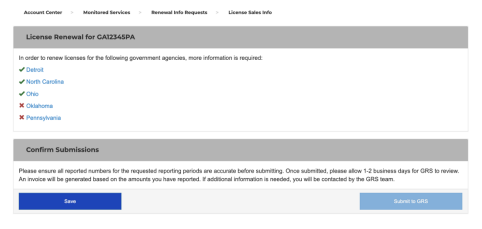
Each completed state will show a green checkmark instead of a red X.
Step 5: Don’t Miss The Final Confirm Button
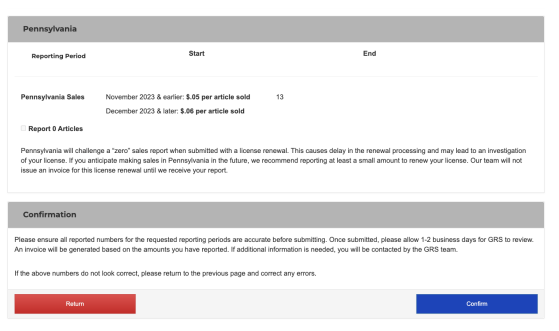
This is the most common mistake. After completing all states, you’ll see a recap page. You must click “Confirm” at the bottom to officially submit your sales reporting. Until you do, the request is not finalized.
Once confirmed, you’ll see a success message and the request will move to Renewal Info Request History.
Make Sales Reporting Easier Next Time
If sales reporting keeps becoming a last-minute scramble, it’s usually because it’s treated like a once-a-year task instead of part of ongoing compliance.
This is your regular reminder that all requests and fees are due upon receipt. Fast responses reduce late fees, lapsed licenses, off-sales risk, and regulatory headaches.
A few habits that help:
- Assign a clear internal compliance owner
- Whitelist GRS emails so requests aren’t missed
- Keep a simple internal system for unit tracking, even if that just a spreadsheet
- Respond when sales info is requested, not when licenses are about to expire
We’ve also rolled out new portal features that make this easier, including better renewal request workflows and future support for multi-year sales reporting.
Quick Recap: What’s Required And What Isn’t
You are responsible for:
- providing unit sales data or reasonable estimates when requested
- completing all state entries and clicking the final Confirm button
- responding promptly so renewals stay on track
You are not required to:
- have a perfectly audited, state-by-state sales system to stay compliant
For deeper state-by-state details, the annual sales reporting guide is a great reference. And if you’re ever unsure, the GRS team is here to help. Our goal is confidence and continuity, not catching anyone out!
Stuffed Article Registration Types: Manufacturer, Importer, or Joint — Which One Do You Need?
Violations Are Surging: Here’s Why & How to Resolve Them
Want the latest articles and events delivered to your inbox?

Navigate
Services
Services
Stay in Touch
Sign up for Updates