
Go Back
Industry News and Updates
North Carolina Renewal Season: What to Do + What to Avoid
If you hold a North Carolina license, this is your friendly annual reminder: renewal season comes around every year whether we’re ready for it or not!
North Carolina is one of those states where renewals are routine if you follow the process — and frustratingly complicated if you don’t. We wrote this post to be your evergreen reference for how North Carolina renewals work, what information is required, and how to move through the process smoothly.
Think of this as the “how it works” guide you can bookmark, share internally, and come back to each renewal season. (Current-year deadlines will always be communicated separately via GRS renewal emails. You can sign up for those here!)
Why North Carolina Renewals Deserve Extra Attention
North Carolina licenses don’t just quietly lapse. If a license is not renewed within the state’s allowed window following expiration, the state can deactivate it, which may trigger re-registration requirements instead of a standard renewal.
In practical terms:
- Renewing on time is predictable and manageable
- Missing the renewal window can mean additional paperwork, additional fees, and avoidable delays
That’s why GRS emphasizes early awareness and clean submissions for North Carolina. A little preparation here saves a lot of back-and-forth later.
The Core Requirement: A Sales Report (Even If It’s Zero)
Every North Carolina renewal includes a sales reporting component tied to a specific reporting period defined by the state.
One important thing to keep in mind: Even if your sales into North Carolina were zero, the form is still required. This catches people every year. “Nothing to report” still needs to be reported and skipping the form entirely is one of the fastest ways to create renewal issues.
What You’ll Need Before You Start
Before logging in and downloading forms, it helps to gather a few things internally:
- Sales information for the required reporting period
- Clarity on where your products are manufactured
- The correct signer (typically your CFO or primary bookkeeper)
Getting these pieces aligned early makes the rest of the process much smoother.
How to Renew Your North Carolina License
Here’s the repeatable process you’ll follow each renewal season.
Step 1: Log into your GRS account
Start by logging into your GRS account as you normally would. And if you’re not working with us yet, here’s how you can get started!
Step 2: Review licenses flagged for renewal
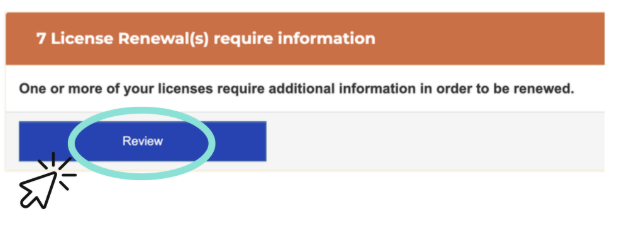
Once logged in, look for the orange banner at the top of your account center page. This banner indicates licenses that need review. Click the blue “Review” button.
If you believe a North Carolina license should be up for renewal and you don’t see a prompt, reach out to the GRS team so we can help confirm what’s happening in your account.
Step 3: Download the North Carolina Renewal Form
From your account, download the North Carolina renewal form. This is the form you’ll use to report sales and provide required details for the renewal.
This is the only form North Carolina will accept; using an outdated or incomplete version can delay review.
Step 4: Complete the form with sales information
Fill out the form using your sales data for the reporting period requested by the state.
A few reminders here:
- Zero sales still require a completed form
- Accuracy matters more than speed
- If multiple teams handle sales data, give yourself time to coordinate
Step 5: Complete the correct section of the form
The North Carolina renewal form includes different sections depending on where products are manufactured and how they are sold.
Generally:
- Sections 1 and 2 apply to manufacturers located in North Carolina
- Section 3 applies to products manufactured outside North Carolina and sold into the state
If you’re unsure which section applies, that’s okay. Submit what you believe is correct and flag questions for the GRS team.
Step 6: Obtain the required signature
North Carolina requires the form to be signed by an authorized individual, most commonly a Chief Financial Officer or the company’s primary bookkeeper
The signature, printed name, and date must all be included. This is a common bottleneck, so it’s worth planning ahead.
Step 7: Upload the completed form to GRS
Once the form is complete and signed, upload it to your GRS account.
From there:
- GRS reviews the form for completeness
- We prepare the renewal invoice
- And guide the renewal through the state process
Common Renewal Pitfalls (and How to Avoid Them)
After many renewal seasons, a few patterns show up again and again.
Skipping the form because sales were zero. North Carolina still requires documentation. Zero is valid but silence is not.
Using the wrong section of the form. Manufacturing location matters. When in doubt, ask.
Waiting too long to collect signatures. Internal delays are the most common reason renewals feel stressful. Give yourself more time than you think you’ll need.
Assuming no alert means no action. If something feels off in your account, it’s always better to check than to guess.
Keep It Simple, Keep It Compliant
North Carolina renewals don’t need to be complicated, but they do need to be handled consistently.
Each year, the process is the same:
- Download the form
- Report sales (even if zero)
- Get the proper signature
- Upload to GRS for review
If you follow that flow, renewal season becomes just another manageable compliance task instead of a fire drill. We’re here to help make sure your license stays active and your team stays focused on everything else you’ve got going on.
What Pennsylvania’s New Covering Testing Requirement Means for Your Stuffed Products
Sales Reporting in the GRS Portal: A Step-By-Step Plan & The Button Many People Miss
Want the latest articles and events delivered to your inbox?

Navigate
Services
Services
Stay in Touch
Sign up for Updates